 GoodMem
Optimize retrieval in GoodMem Cloud
Compare embedders and rerankers on your content, interpret retrieval-quality results, and apply a selected pipeline in GoodMem Cloud.
Use Retrieval Optimizer to compare embedders and rerankers on your own content and queries.
This guide walks through creating an experiment, interpreting its ranked results, and applying the selected pipeline to your application.
A retrieval pipeline consists of one embedder and an optional reranker. The optimizer evaluates the selected models with their existing weights. Model fine-tuning is a separate workflow.
Before you start
Before creating an experiment, make sure you have:
- A running GoodMem Cloud instance and a source memory space containing ingested content.
- The embedders and any rerankers you want to compare, registered with working endpoints and credentials.
- A registered LLM to judge the relevance of retrieved results.
- The Tune permission in your Cloud workspace.
You can compare supported off-the-shelf models, including models you host yourself, once they are registered in the instance.
If you do not have tuning access, the Tuning page displays the available action. Eligible administrators can select Enable tuning for me; other members should ask a workspace administrator to grant the Tune permission.
See Endpoint registration to configure your models and Build a basic RAG agent to create a space and ingest content.
Create an experiment
Open Tuning → Optimize pipelines in GoodMem Cloud, then select Start an optimization.
1. Set the experiment basics
Under Basics, choose the GoodMem instance and source memory space. Give the experiment a name that identifies what you are comparing.
Select an Experiment effort:
| Mode | Use |
|---|---|
| Quick | Run a smaller initial comparison. |
| Balanced | Compare all selected pipelines with a moderate query budget. |
| Thorough | Compare all selected pipelines with a larger query budget. |
| Custom | Set the query and pipeline budgets yourself. |
The form shows the effective query count and pipeline coverage. With Custom, edit the pipeline budget under Pipelines to compare and the query count under Queries for evaluation.
Increasing the effort generally increases retrievals and model calls. Effort controls the amount of evaluation work; it does not specify a monetary spending limit.
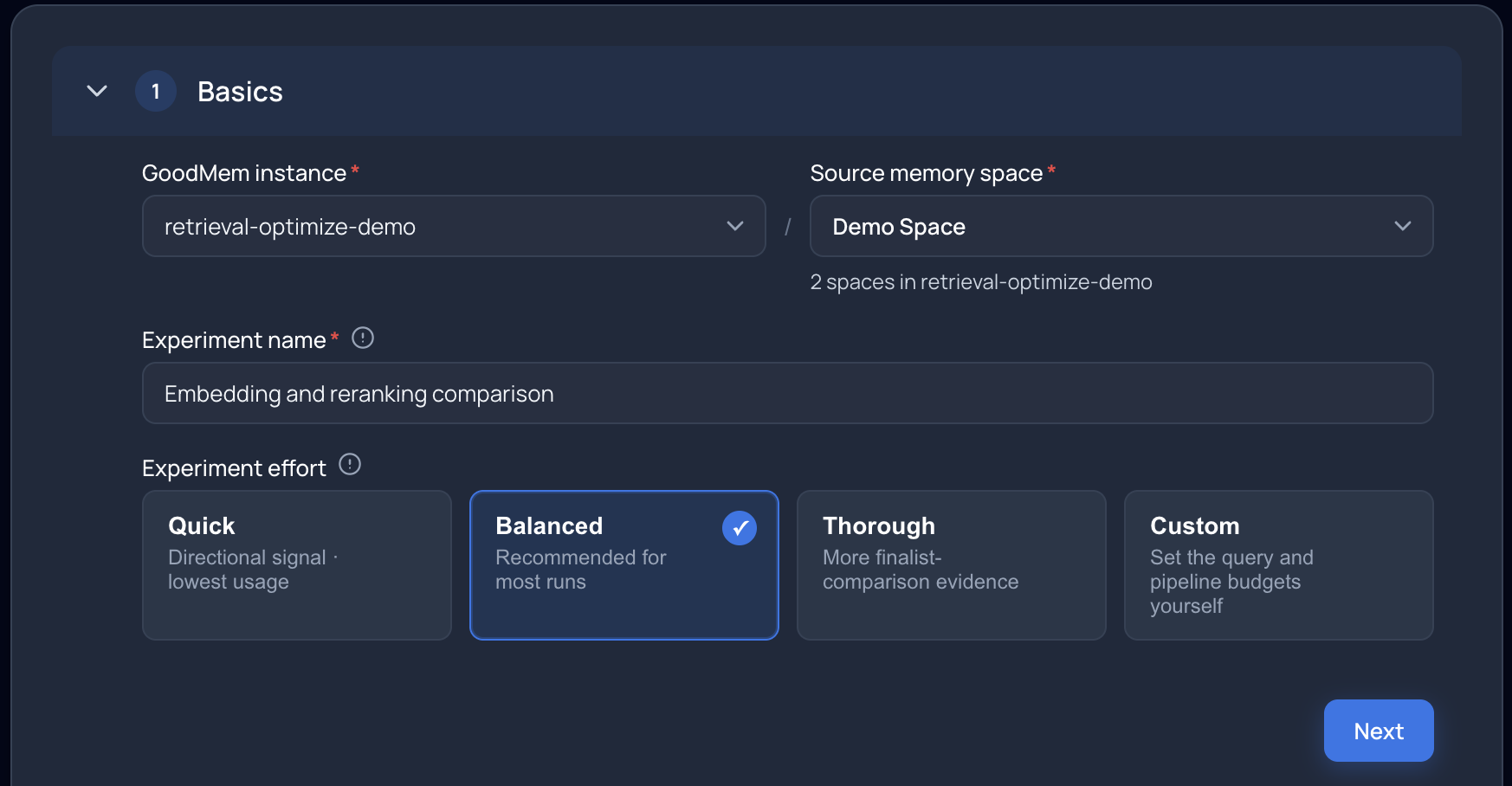
Choose the source memory space and experiment effort. The screenshots follow one example experiment; your available models and results will differ.
2. Select pipelines to compare
Under Pipelines to compare, choose the embedders and reranker options.
GoodMem forms candidate pipelines from these selections. For example:
- Two embedders and one reranker produce two pipelines.
- Including No reranker adds an additional pipeline for each embedder, producing four pipelines in total.
Including a configuration without reranking helps you evaluate the contribution of a reranker.
If your pipeline budget is smaller than the number of candidates, the experiment will evaluate only part of the selection. Check the Experiment summary before starting.
You can optionally identify a Reference retrieval pipeline, such as your current application configuration. The reference runs first and is protected from early elimination during screening. If it completes screening, it advances to the finalist comparison. It is marked Reference in the results. Keeping this baseline in the comparison can increase the work and cost of the run.
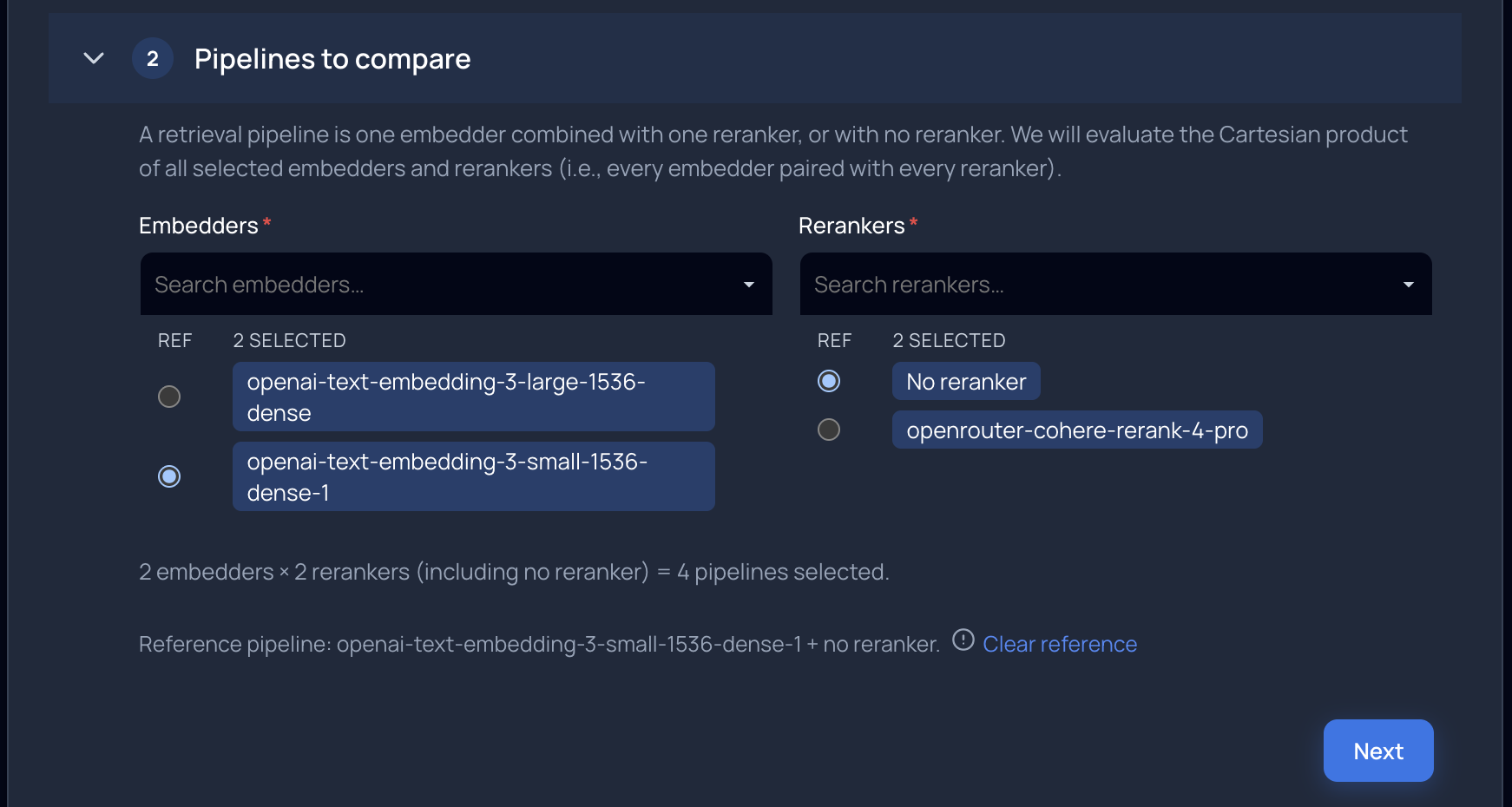
Two embedders, each tested with and without reranking, produce four pipelines. The small embedder without reranking is the reference.
3. Configure queries for evaluation
Under Queries for evaluation, review the total query count and choose the sources that will supply it.
| Query source | Configuration |
|---|---|
| Provided queries | Paste questions or upload a .txt file, with one query per line. |
| Observed queries | Include queries recorded for the selected space, with a maximum count and an optional lookback period. |
| Generated queries | Generate additional questions from content in the source memory space. |
Use queries that represent the tasks your application needs to support. Include the terminology and phrasing your users use, along with important topics that might be less common in recorded traffic.
Provided queries take priority, followed by eligible observed queries. Generated queries fill the remaining target when generation is needed. The form shows the planned contribution from each source.
The observed-query count is a maximum, not a guaranteed count. If fewer eligible queries are available, the run uses those it finds and generates the shortfall. Observed queries require query logging, and their availability depends on the instance’s logging policy.
For generated queries, you can choose an LLM for generating queries. If you leave this unset, the run uses the judge LLM selected under Evaluation settings.
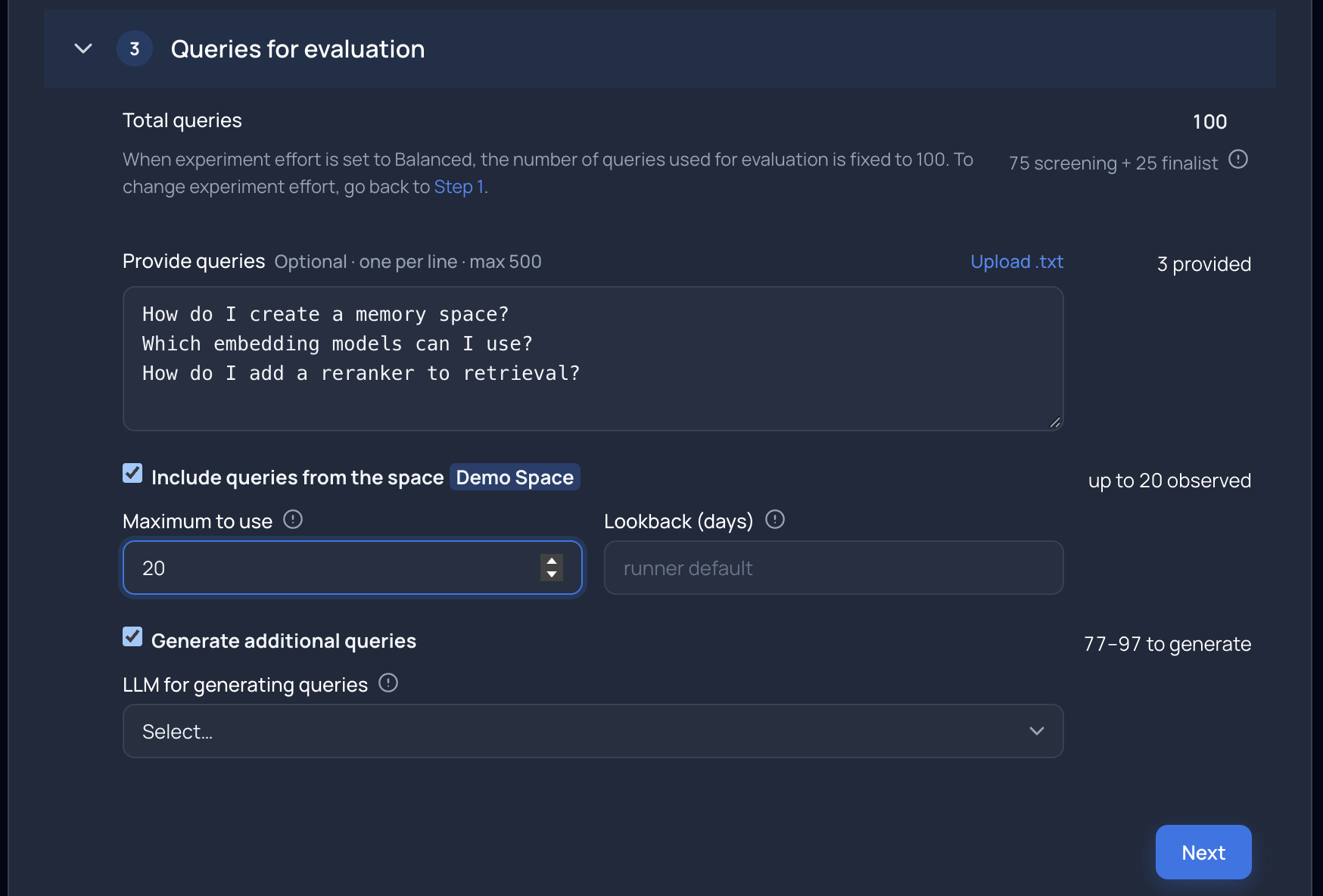
A 100-query target combines three provided queries, up to 20 observed queries, and generated queries for the remainder. The generated count depends on how many eligible observed queries are found.
Why queries are split into two stages
The experiment divides its queries between screening and finalist comparison:
- Screening evaluates candidate pipelines to identify promising options for a closer comparison.
- Finalist comparison evaluates those selected pipelines on a separate set of queries held back from screening. The finalists are compared on the same held-back queries, and this stage supplies the evidence for the final ranking.
The held-back queries check whether a pipeline’s screening performance carries over to questions that were not used to select it.
4. Review evaluation settings
Under Evaluation settings, select the LLM as the judge. This model assesses how relevant the retrieved passages are to each query.
Retrieval quality is measured using NDCG, a score from 0 to 1 that captures both the relevance of the results and their order. A pipeline scores better when it retrieves useful passages and places the most relevant ones near the top. NDCG@K means that the score considers the first K results—for example, NDCG@5 evaluates the top five results for each query.
Review the settings that define the comparison:
| Setting | Meaning |
|---|---|
| Results per query (NDCG@K) | How many of the top retrieved results are scored for each query. |
| Retrieval depth | How many results are retrieved before reranking. |
| Rerank fan-out | How many retrieved results the reranker reorders. |
| Practical NDCG difference | How large a quality improvement needs to be before you consider it worth distinguishing. |
These settings apply consistently across the pipelines within a run.
The Practical NDCG difference helps the experiment distinguish small score differences from improvements large enough to matter. For example, if you set it to 0.05, scores of 0.72 and 0.70 are only 0.02 apart—below your chosen margin. Scores of 0.72 and 0.65 are 0.07 apart—above it.
This margin is an absolute difference in NDCG, not a percentage improvement. The experiment also considers uncertainty: the observed score gap alone does not determine whether it can confidently identify a better pipeline.
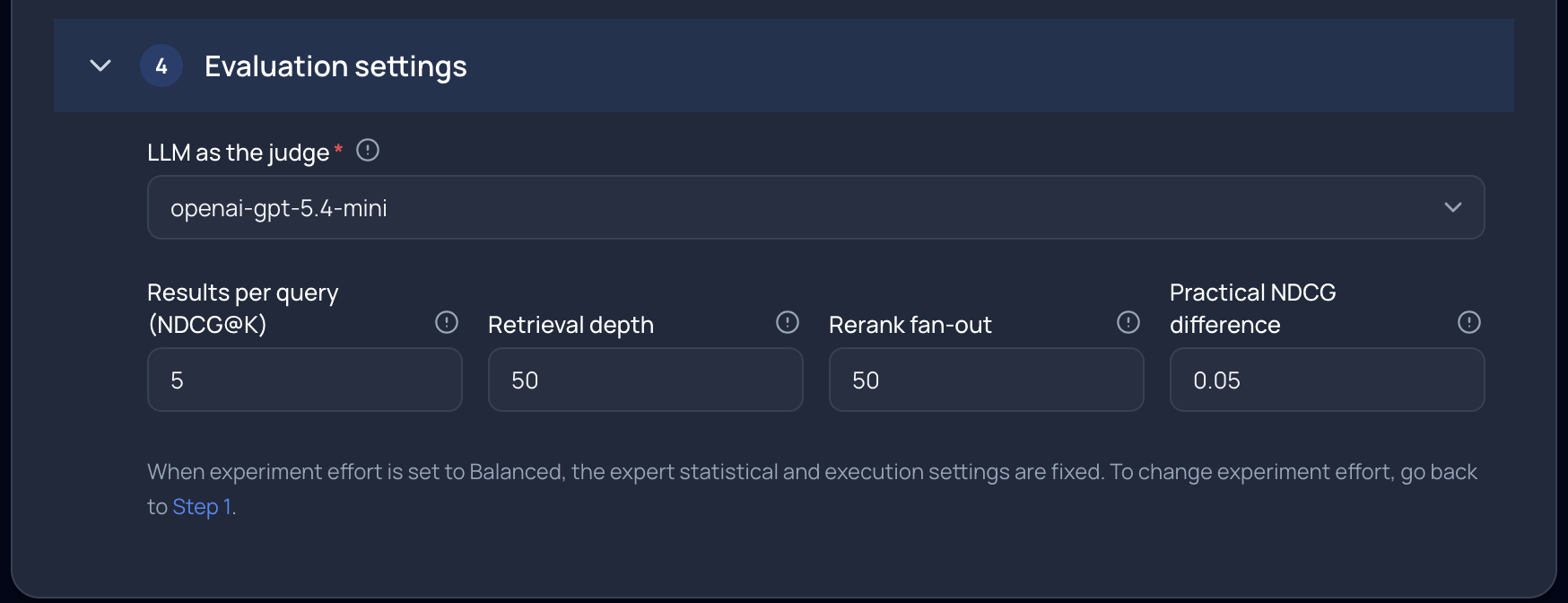
The judge and evaluation settings apply consistently across the pipelines.
Review the Experiment summary, resolve any validation errors, and select Start experiment.
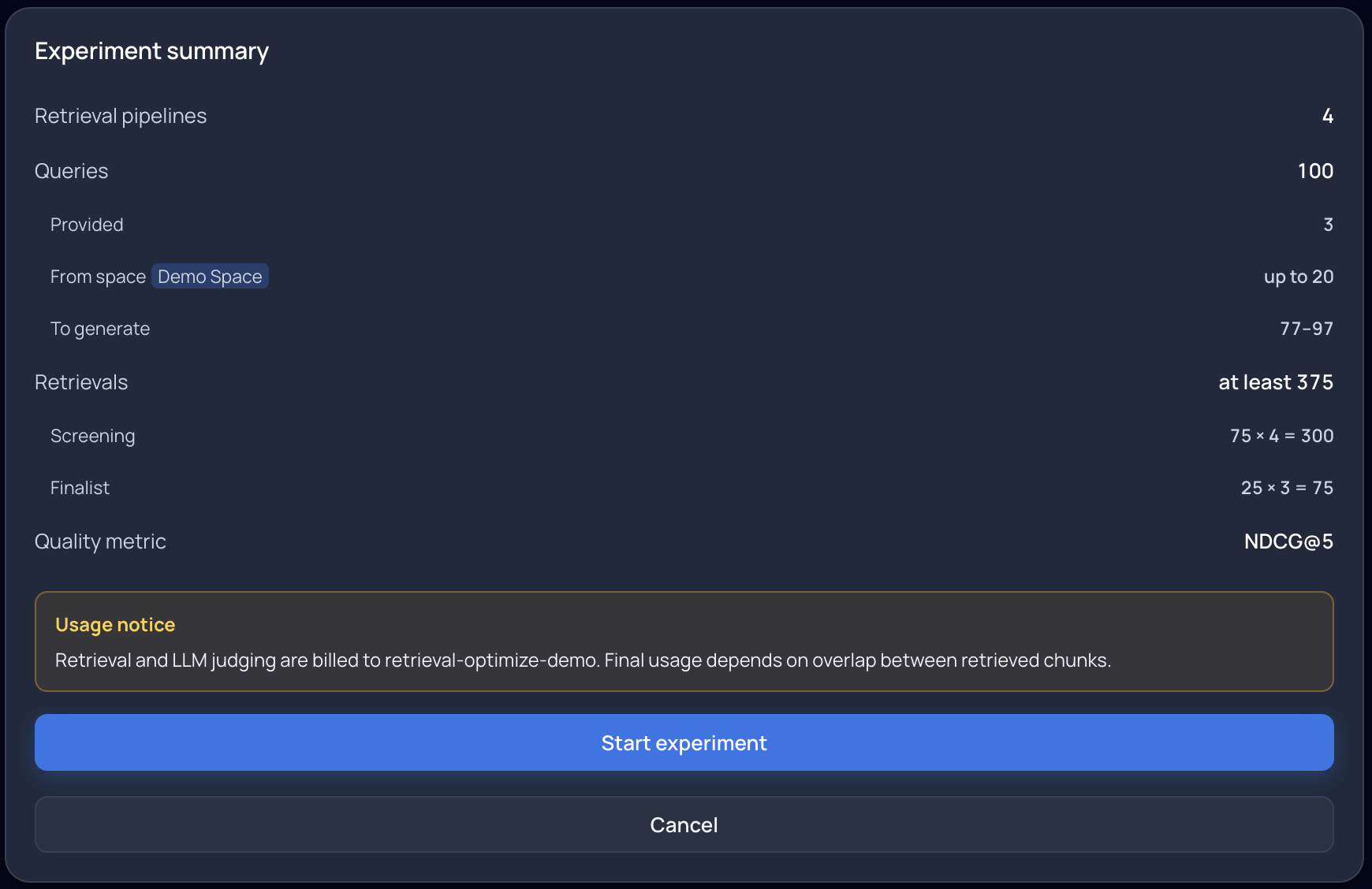
Review the planned query allocation and retrieval estimate before starting.
Monitor the run
The job page reports progress through preparation and evaluation. The Run status panel shows elapsed time and reported spend.
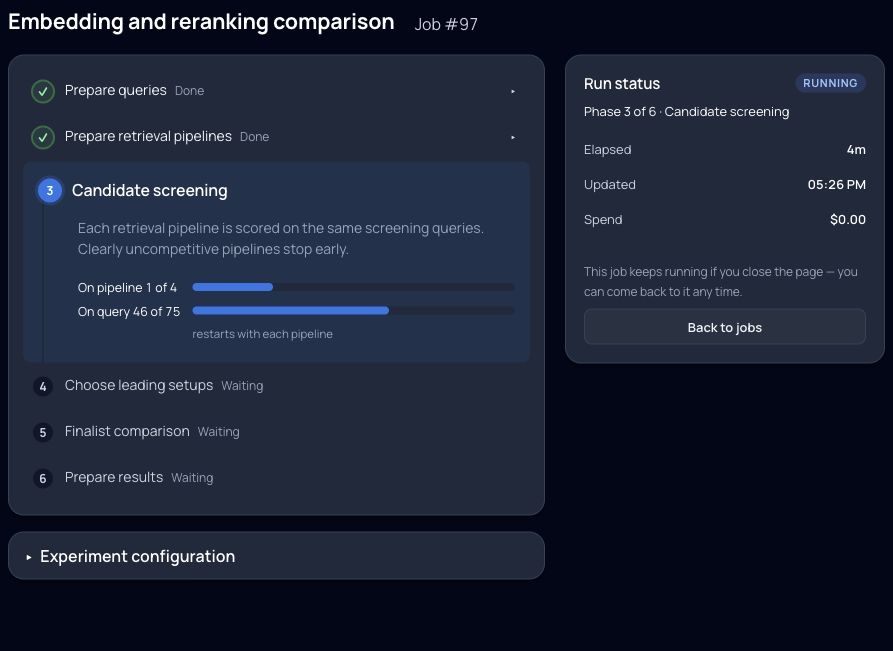
Track the active stage alongside the Run status panel. The experiment continues if you leave the page.
Testing another embedder may require preparing and embedding a copy of the source content. For larger memory spaces, preparation can take a substantial part of the total runtime. Runtime also depends on the selected models, query count, pipeline budget, and evaluation settings.
Compatible prepared spaces can be reused in subsequent experiments while they remain available. Deleting a prepared space removes that opportunity for reuse.
Understand the results
The results page ranks finalist pipelines by Mean NDCG on the finalist-comparison queries. Higher values indicate better average retrieval quality under the experiment’s evaluation settings.
The score measures how well a pipeline finds useful source material. For example, for “How do I reset my password?”, the judge checks whether the retrieved passages contain relevant password-reset instructions and whether those passages appear near the top. Your application may then use those passages to write an answer; that generated answer is not scored by this experiment. An NDCG value is therefore not the percentage of questions answered correctly.
Quality and uncertainty
| Result | Interpretation |
|---|---|
| Mean NDCG | Average retrieval quality on the evaluated finalist-comparison queries. |
| Range beside the mean | A range of plausible values for the pipeline’s average quality, reflecting uncertainty from the available queries. |
| Best chance | Estimated chance that the pipeline has the highest average quality among the finalists, even if its advantage is small. |
| Near-best chance | Estimated chance that the pipeline is close enough to the best finalist to fall within your chosen practical NDCG difference. |
| Meaningful lead | Estimated chance that the pipeline exceeds every other finalist by at least your chosen practical NDCG difference. Available under More detail. |
Small score differences do not necessarily mean one pipeline will reliably perform better on other representative queries. Near-best chance includes the chance of being best.
Green highlighting identifies pipelines whose near-best chance meets the run’s evidence threshold—the minimum probability required before marking a pipeline near-best. For example, with a practical difference of 0.05 NDCG and a threshold of 95%, a pipeline with a 97% near-best chance is highlighted; one with an 80% chance is not. The latter may still be competitive, but the evidence is less certain.
A second-ranked pipeline can therefore be highlighted alongside the first. Each meets the evidence threshold for being near-best; the highlighting does not establish that the two pipelines are interchangeable. Check Meaningful lead before treating first place as evidence of a substantial advantage.
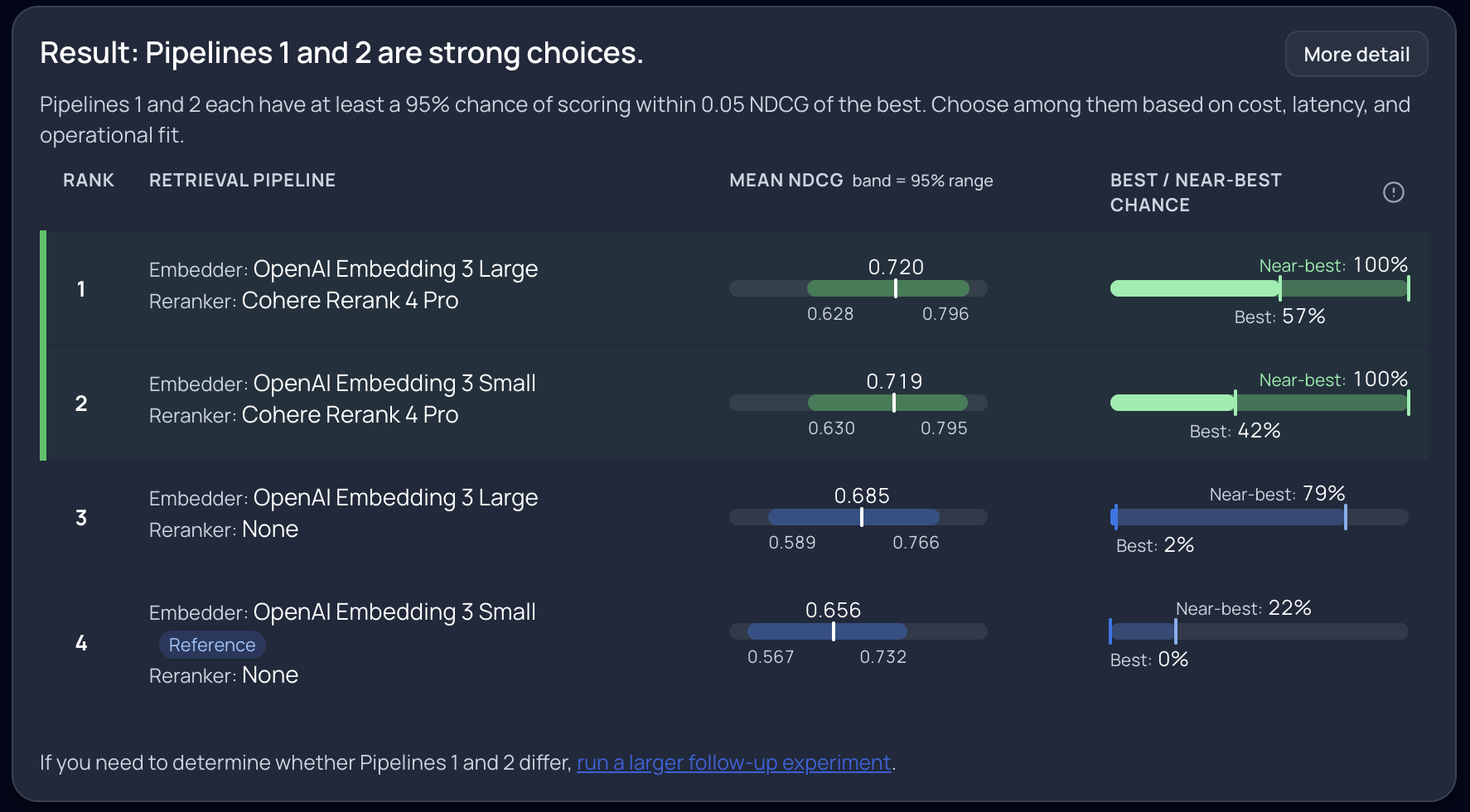
In this example, both reranked pipelines are highlighted as near-best despite occupying different ranks. These results apply to this experiment’s content and queries.
Review coverage and configuration
Use Observations and evidence to inspect pipeline outcomes and finalist-comparison query coverage. This helps explain why some selected pipelines do not appear in the ranked results.
The page also provides access to available Run files and the recorded experiment configuration. Use these when reviewing a result or planning a follow-up experiment.
The findings apply to the pipelines and queries evaluated in that run. Pipelines outside its coverage have not been established as better or worse.
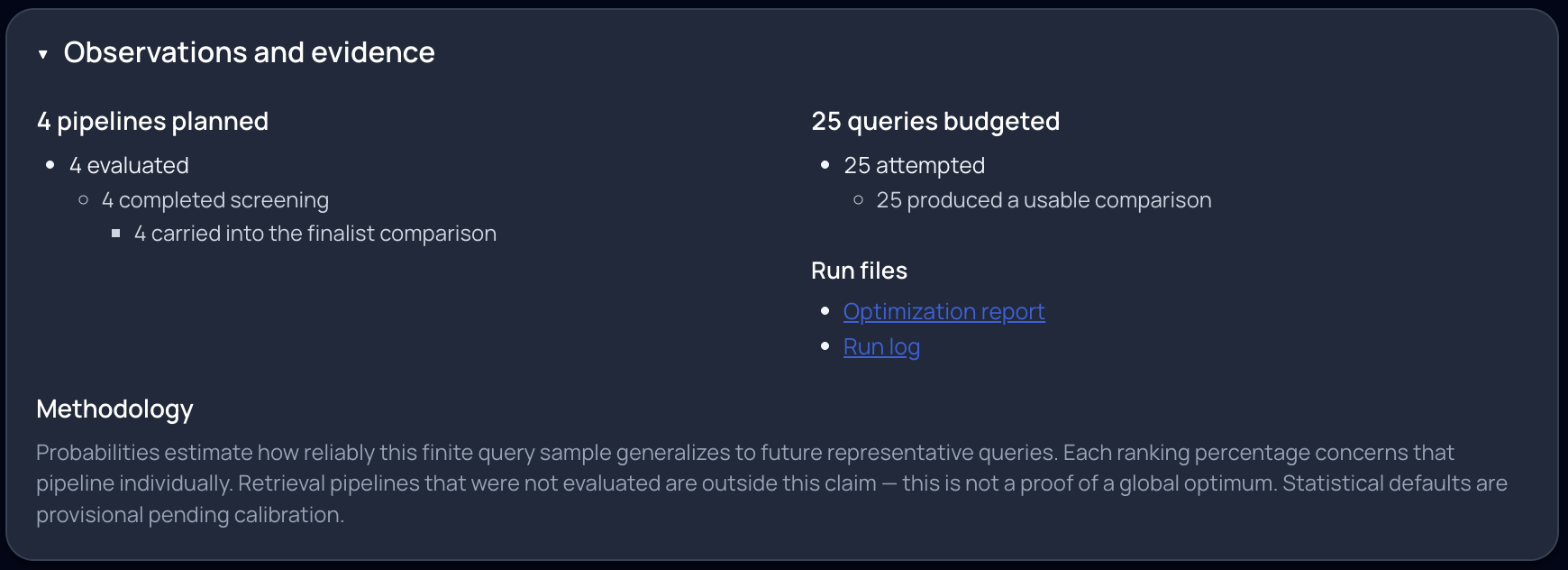
Check pipeline coverage, usable finalist-comparison queries, and available run files.
Apply what you learned
When several pipelines show strong evidence of near-best quality, compare their latency, model cost, and hosting requirements before choosing one. Those considerations are separate from the retrieval-quality ranking.
If the result is inconclusive, check whether the queries cover your application's tasks and terminology. Run a follow-up experiment with a larger or more representative query set.
Configure your application
The optimizer does not change your application's retrieval configuration automatically.
- Choose a space with the selected embedder. If your existing space already uses that model, you can continue retrieving from it. If you change embedders, create a space with the selected embedder, ingest your content, and wait for processing to complete. Update your application's space ID to point to that space.
- Set the selected reranker. Use its registered ID in the retrieval request's post-processor configuration. If you chose No reranker, remove the reranker configuration from that request.
- Verify retrieval in your application. Run representative queries, inspect the retrieved passages, and measure latency and cost. If your application generates answers, evaluate those answers too; the optimizer scores retrieval quality.
For example, send this JSON body to your instance's POST /v1/memories:retrieve endpoint, replacing the space and reranker placeholders with their registered IDs:
{
  "message": "How do I reset my password?",
  "spaceKeys": [
    {
      "spaceId": "YOUR_SELECTED_MODEL_SPACE_ID"
    }
  ],
  "requestedSize": 50,
  "postProcessor": {
    "name": "com.goodmem.retrieval.postprocess.ChatPostProcessorFactory",
    "config": {
      "reranker_id": "YOUR_SELECTED_RERANKER_ID",
      "max_results": 5
    }
  }
}
This example retrieves up to 50 candidates, reranks them, and retains up to five results after a successful rerank. It illustrates the screenshots' retrieval depth and rerank fan-out of 50, with five final results. It does not call an LLM to generate an answer. For a pipeline without reranking, omit postProcessor and set requestedSize to the number of results your application needs.
See ChatPostProcessor for configuration and reranker-failure behavior, Streaming responses for handling retrieval events, and Use the reranker in a RAG agent for complete CLI and SDK examples.
Run another experiment when your content, query patterns, or available models change. Retain the experiment configuration and results so you can understand the basis for each choice.